


TuneIn Radio Pro - Live Radio
4.615.47K Reviews
App Specs
- Version
- 42.3
- Updated On
- License
- $9.99
- Downloads
- 1,000,000+
- Developer
- TuneIn Inc
- Categories
- Music & Audio
- Platform
- Android, iOS
Screenshots


 Analysis by AppCompare
When several people share a kitchen speaker, a family tablet, or the car’s audio system, radio can be an easy way to agree on what plays without passing around a playlist. That is the kind of everyday setting where TuneIn Radio Pro makes sense to me: one person can look for a station, another can suggest a different kind of listening, and the household can move between live broadcasts and spoken shows. The main advantage is variety; the main thing to plan around is that a shared device can make personal listening choices less private.
One device, several listening habits
A household might use the app differently at different times of day. Someone could put on a local station while making breakfast, switch to a talk program during a chore, and let another person choose music later. That flexibility is more useful than it sounds: live radio gives a shared room a common soundtrack, while podcasts suit one person’s more focused listening. I would treat favorites as a practical shortcut for stations the household already agrees on, rather than expecting recommendations to suit everyone.
It also helps to decide whose device or account is being used before building a listening routine around it. A favorite list can become a personal collection, and suggestions based on listening habits may reflect whoever uses the app most. If multiple people take turns, I’d keep commonly used stations easy to find and avoid assuming that the home screen will represent every listener equally. That small bit of coordination can prevent the app from feeling as though it belongs to only one person.
Set expectations before handing over the phone
For shared use, I’d show another listener how to search for a station and return to the main screen rather than leaving them to explore every menu. It is a simple way to make the app approachable without turning setup into a household project. I’d also agree on whether recordings and favorites are personal or available for everyone who uses the device. Those are not complicated decisions, but they matter when a phone or tablet regularly changes hands.
One practical trade-off is that live radio and podcasts behave differently. A live broadcast fits a shared moment because everyone hears the same program at once; a downloaded podcast is better suited to one person listening later. If someone is planning a trip or a commute, downloading a podcast beforehand can make the listening plan less dependent on a stable connection. For a family room, meanwhile, choosing a station before starting a task avoids turning a quick listen into a long search session.
Age context and trust
The app carries a Teen age rating, which is useful context for households deciding whether it suits a younger listener. I would still help a teen choose stations and shows at first, especially because radio and talk content can vary widely in subject and tone. That is a matter of listening together and setting expectations, not assuming that every station or podcast will be suitable just because it appears in the same app.
There is also a difference between a shared entertainment device and a personal phone. On a common tablet, a sleep timer can be useful at bedtime, while favorites can make familiar content quick to reach. On a personal device, someone may prefer to keep their listening choices separate. I would not choose TuneIn as a substitute for household agreements about media; it works best when those expectations are already clear.
Worth Reading Before You Choose

EA SPORTS FC Mobile 26 Is a Bigger Football Game, but It Takes Time

Flipboard Shows What News Apps Must Do Beyond the Feed

Switching to Android Auto Means Rethinking Your Driving Routine

Google Calendar Makes a Crowded Week Easier to Manage

Ludo King Makes the Most of the Minutes Between Plans

Baby Panda World Brings Quick Play to Modern Phones, but Its Game Library Feels Busy
Exploring a World of Audio
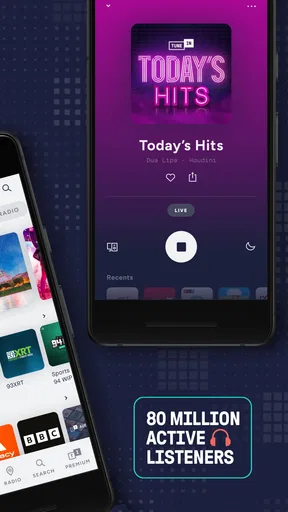
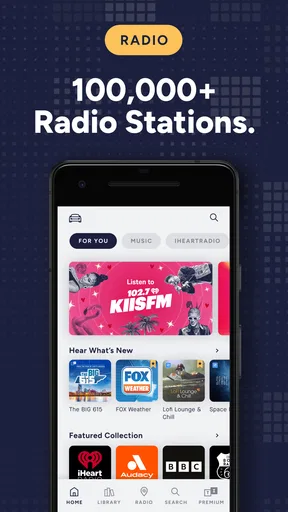
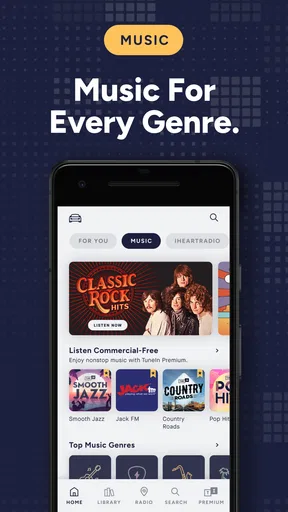
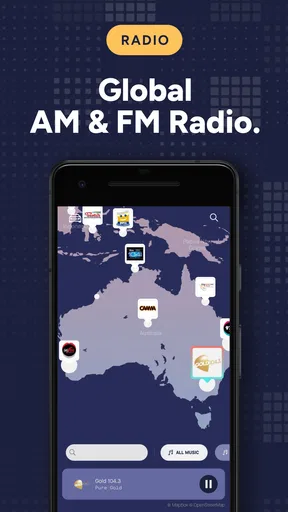
So, what's the deal with TuneIn Radio Pro? Essentially, it’s an app that opens up a universe of live radio stations from all over the globe. Whether you’re into rock, jazz, or classical, or you're just looking for the latest talk shows, TuneIn has something up its sleeve for you. I was pleasantly surprised by the sheer variety. It’s like having the world’s radio stations in your pocket.
The User Experience
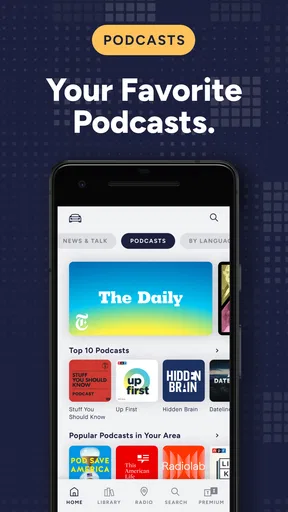
Getting started with the app is a breeze. Once you fire it up, you’re greeted with a clean and intuitive interface. Right from the main screen, you can dive into different genres or explore trending stations. I found navigation to be pretty straightforward, with everything just a tap away. You can search for stations by location, language, or even by specific shows. This flexibility is a game-changer, especially if you're a bit picky like me.
Now, here’s something that really stood out to me: the ability to pause and rewind live radio. How cool is that? If you miss something important, you can just rewind and catch up. This feature is particularly handy during talk shows or when you’re listening to sports commentary.
An Ad-Free Experience
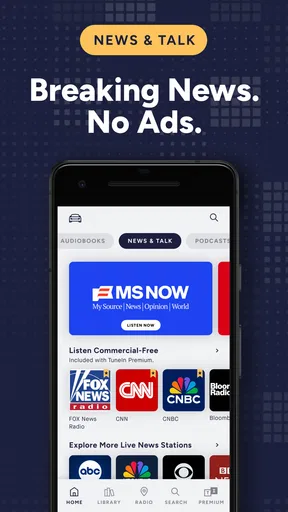
One of the perks of the Pro version is the ad-free experience. No one likes being interrupted by ads, especially when you’re vibing to your favorite tunes. With TuneIn Radio Pro, you get uninterrupted listening, which for me, is worth every penny.
Additionally, the app allows you to record live radio. Imagine capturing that live concert broadcast or an insightful interview to listen to later. It’s like having a DVR for radio, and I found this feature super useful during my daily commute.
Podcasts Galore
If you’re a podcast junkie, you’re in for a treat. TuneIn Radio Pro isn’t just about live radio; it hosts a treasure trove of podcasts. From popular series to niche topics, the selection is impressive. I’ve discovered some gems that I wouldn’t have stumbled upon otherwise. Plus, you can download podcasts for offline listening, which is perfect for those long flights or trips without internet access.
Customizable Features
Another feature that I appreciated was the app’s customization options. You can curate your own list of favorites for quick access, and the app even suggests stations based on your listening habits. It’s like having a personal DJ who knows your taste.
Moreover, the sleep timer is a handy feature for those who like to doze off to the sound of music or a soothing podcast. Set the timer, and the app will shut off automatically, ensuring you don’t wake up to the news blaring at 3 AM.
Choosing it over other listening apps
TuneIn sits in an interesting middle ground between a conventional radio app and an on-demand music or podcast service. I’d reach for it when I want a station to make the decisions for me, when I want to hear a live broadcast, or when I’m curious about what people are listening to somewhere else. A music-streaming service is usually the better fit if I want to choose a particular track and build a precise playlist; a podcast-only app can be simpler if nearly all I listen to is a queue of saved episodes.
That difference changes how I use search. Instead of searching only for a song or artist, I can look for a station by place, language, or show and let its schedule guide the session. It is a good way to add local perspective or hear a different style of programming, but it is less predictable than selecting a specific album. If I need a particular track right now, radio is the wrong tool; if I want the next hour to unfold without constant choices, it can be the more relaxed one.
A few practical listening habits
For a commute, I would save a small set of dependable stations and use search for exploration when I have time to browse. That separates quick access from discovery: I can start listening promptly on an ordinary morning without giving up the chance to find something new later. If a live interview or game has a section I missed, pausing and rewinding can be more useful than trying to locate a later recap, though that advantage matters most when I’m following a specific broadcast.
Recording live radio is another feature I’d use selectively. It makes sense when a program is scheduled at an inconvenient time or I want to keep a broadcast for later, but it does not replace the flexibility of choosing an individual song from a catalog. I’d think of it as a way to preserve a program I care about, not as a general recording habit. For travel, downloaded podcasts are the more straightforward preparation; they give me something ready to play when a connection is unavailable.
The app’s breadth is also its main browsing challenge. A large selection can leave me with too many possibilities if I open it without knowing what kind of listening I want. I get better results by starting with a purpose—background music, a particular kind of talk, or a show I already know—then exploring from there. Favorites help once I have found reliable stations, while recommendations are useful as prompts rather than instructions; a household’s shared listening can make those suggestions less personal.
Who will get the most from it?
I’d recommend TuneIn to someone who enjoys the character of live radio, wants spoken programs alongside music, or likes discovering stations beyond the handful they already know. It is especially appealing if listening is part of a routine: a station in the background while cooking, a talk show during a drive, or a podcast saved for a journey. The mix gives me more reasons to open it than a radio-only player would, without requiring every session to be carefully planned.
I would hesitate to recommend it to a listener whose only goal is exact control over songs, albums, or playlists. A focused music service is likely to feel more direct for that job. Likewise, someone who only follows podcasts and values a streamlined episode queue may prefer an app built around that habit. TuneIn’s appeal is the blend, so its range is an advantage only if the listener will actually move among radio, talk, sports, music, and podcasts.
It is also worth considering the difference between the app’s Pro purchase and ongoing spending. The listed price is $9.99, and in-app purchases range from $0.99 to $99.99 per item, so I would review the purchase screen carefully and decide what is worth paying for rather than assuming every listening option is included in one cost. The ad-free experience is a meaningful reason to consider Pro, but the value depends on how often interruptions bother you and how regularly you use live radio.
Compatibility, cost, and everyday fit
TuneIn Radio Pro is a Music & Audio app from TuneIn Inc. It has a 4.6 average from around 123,000 ratings, with more than 1 million installs, which suggests that it has found a substantial audience without telling me whether its mix is right for a particular listener. It was released on February 12, 2010, and its current version is 41.0. The minimum operating-system requirement is 7.0, so I’d check the device’s software compatibility before making a purchase, particularly if the household uses an older phone or tablet.
For a realistic weekday routine, I can picture starting a station while breakfast is being made, switching to a familiar talk program on the drive, and downloading a podcast in advance for the return trip. Each choice suits a different moment: live radio keeps the shared room or car simple, while an offline episode gives one person a defined listen later. That is where the app’s range feels genuinely useful rather than just extensive.
The main friction is not that it lacks listening options; it is deciding which kind of listening fits the moment and keeping shared-device habits clear. A station can be a good communal choice, but personal recommendations and favorites may not suit everyone using the same screen. I would also keep the Teen age rating in mind and make content choices deliberately with younger listeners. Those are manageable considerations, but they make the app a better fit for households willing to coordinate than for people expecting one automatic profile to serve everybody.
My household verdict
Overall, TuneIn Radio Pro is a robust app that caters to radio enthusiasts and podcast lovers alike. Its extensive library, user-friendly interface, and premium features make it a must-have for anyone who loves to stay connected to the world of audio. Whether you’re relaxing at home or hustling through your daily routine, TuneIn Radio Pro is there to keep you entertained and informed. So, why not give it a spin? You might just find your new favorite station!
My recommendation is a little more specific: I’d choose it for a home or shared device where live radio, talk, and podcasts all have a place, and where listeners can agree on a few easy starting points. I’d skip it if exact music selection or a tightly organized podcast-only workflow matters more than station discovery. The Teen rating also makes adult guidance sensible for younger users, while the price and available in-app purchases deserve a quick check before anyone buys. If that balance suits your household, the blend of live listening and saved audio can make this a useful part of the daily routine.
Pros
- Extensive global radio station access
- Ad-free listening experience
- High-quality audio streams
- Offline listening capability
- User-friendly interface
Cons
- Requires subscription for full features
- Occasional streaming interruptions
- No custom playlist creation
- Limited podcast selection
- Higher battery consumption
FAQs for TuneIn Radio Pro - Live Radio
What is TuneIn Radio Pro and how does it differ from the free version?
TuneIn Radio Pro is an enhanced version of the TuneIn app that offers a premium listening experience. Unlike the free version, it is ad-free and allows users to record live radio. This means you can enjoy uninterrupted streams and have the option to save your favorite shows for offline listening.
Does TuneIn Radio Pro require an internet connection to work?
Yes, TuneIn Radio Pro requires an internet connection to stream live radio stations and podcasts. However, the app's recording feature allows you to save content for offline listening, providing flexibility for users who may not always have access to the internet.
Can I access international radio stations with TuneIn Radio Pro?
Absolutely. TuneIn Radio Pro offers access to over 100,000 international radio stations. Users can listen to music, news, sports, and talk shows from around the world, making it a versatile choice for those interested in global content and diverse programming.
Is TuneIn Radio Pro compatible with all smartphones?
TuneIn Radio Pro is available for both Android and iOS devices. Users should ensure their device meets the app's system requirements, which typically include having a recent version of the operating system installed. Compatibility is generally broad, covering most modern smartphones and tablets.
What are some of the key features of TuneIn Radio Pro?
Key features of TuneIn Radio Pro include ad-free listening, the ability to record live radio, and access to a vast library of music, news, sports, and podcasts. The app also offers a user-friendly interface and personalized recommendations based on listening habits, enhancing the overall user experience.


